
RECEPTION AI BY GEEKS OF CYBERNET
We learn your business first. Then we build a receptionist that asks the right questions, qualifies enquiries and helps customers take the next step with your team.
From Ontario real estate to Home Improvements, see how conversations can lead to appointments—and to the online tools that make those appointments more useful.
Free online consultation. Your team confirms the appointment.
A conversation designed around what your business actually needs.
YOUR INDUSTRY. YOUR CUSTOMERS. YOUR PROCESS.
These are two examples of the industry-specific receptionists Geeks has created—not the limits of what we can configure for your company.
ONTARIO REAL ESTATE
We have built specialized versions for real estate agents in Ontario. The receptionist follows the intake questions your team would ask, helps distinguish a buyer from a seller and moves the conversation toward an appointment.
FOR HOMEOWNERS THINKING ABOUT SELLING
Direct sellers to the Sells More Homes home-value tool before their next conversation with your team.
The tool describes its result as an automated market estimate—not a professional appraisal or guaranteed selling price.
Real-estate receptionist test line
222-234-5678
Number supplied for this page. Confirmation pending; calling is not enabled in this preview.
Free online consultation. Supports your team; does not replace a licensed real-estate professional.
HOME IMPROVEMENTS
We specialize in Home Improvements workflows. Your receptionist can qualify the incoming enquiry, understand the project and schedule an appointment—then direct the customer to a relevant online tool.
HOUSEWARMTH EXAMPLE
HouseWarmth’s attic tool is an example of an online resource your receptionist can direct customers to as part of project qualification.
A tool link and automatic data return are different capabilities. We confirm any result-to-CRM integration during setup.
Home Improvements receptionist test line
333-345-6789
Number supplied for this page. Confirmation pending; calling is not enabled in this preview.
Free online consultation. We configure the workflow around your services and team.
Tell us who calls, what they ask and what a qualified enquiry looks like. We will discuss the questions, tools and handoffs that could help.
01
Your services, customers, service area and common enquiries.
02
Qualification questions, approved answers, voice and handoff rules.
03
Appointment processes, your online tools and agreed customer records.
04
Test realistic conversations and confirm the next step before launch.
INSIDE RECEPTION AI
Explore the supplied HouseWarmth administration screens. These are real interface captures with private fields redacted—not fabricated dashboards.
Screens show a configured workspace, not a guarantee that every module is included or that every integration has been tested. Screen metrics are not customer-performance claims.
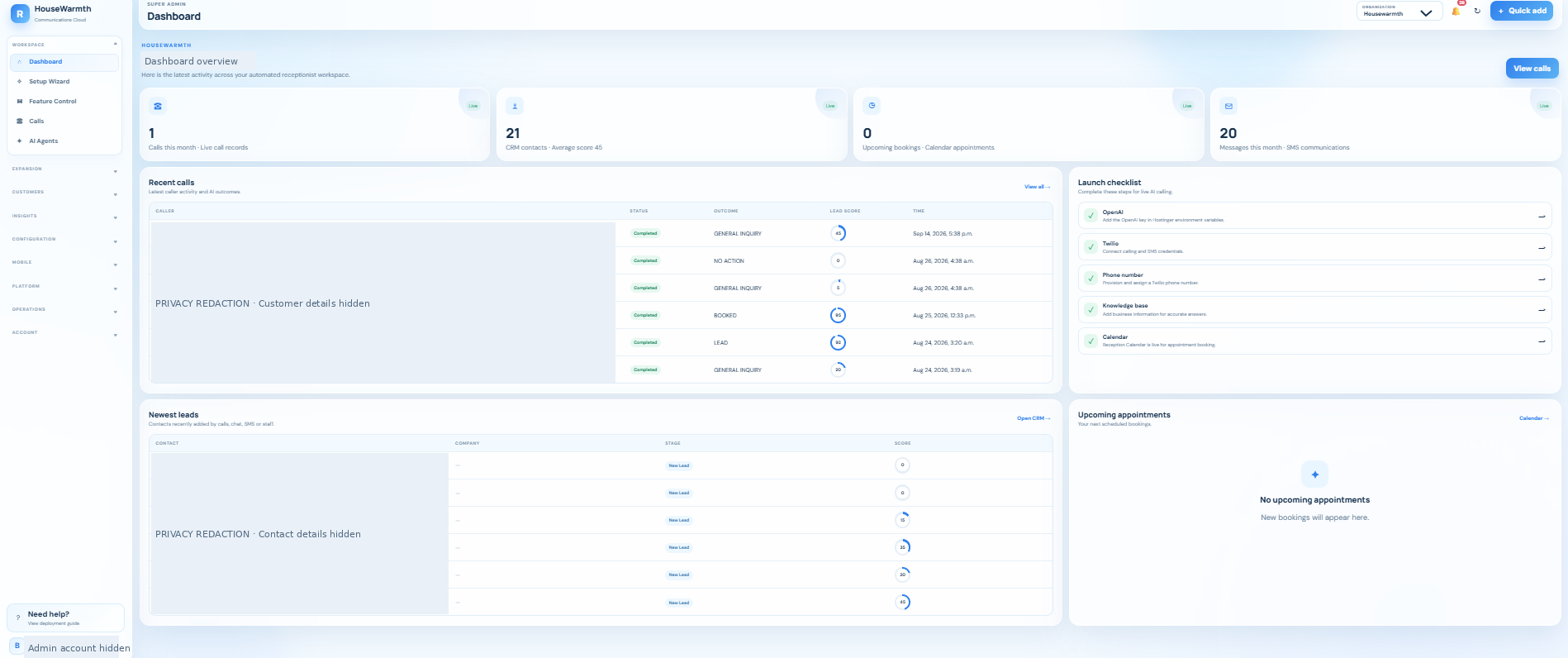
01
The Dashboard brings together recent calls, newly added leads, upcoming appointments and launch-readiness information. A manager can move from an overview to the conversation or customer record that needs follow-up.
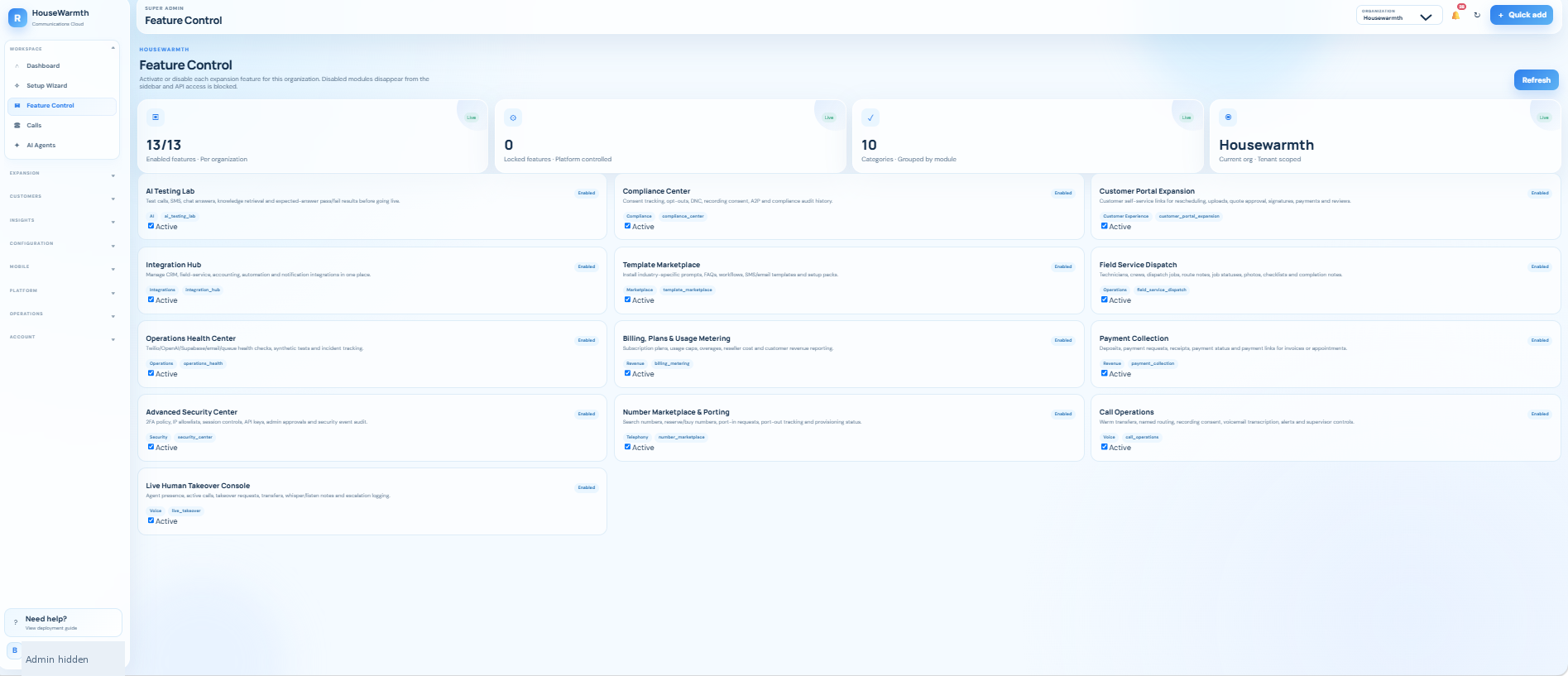
02
Feature Control is where the supplied interface selects expansion modules by organization. The screen shows 13 feature cards, including testing, security, integrations, dispatch and customer-portal functions.
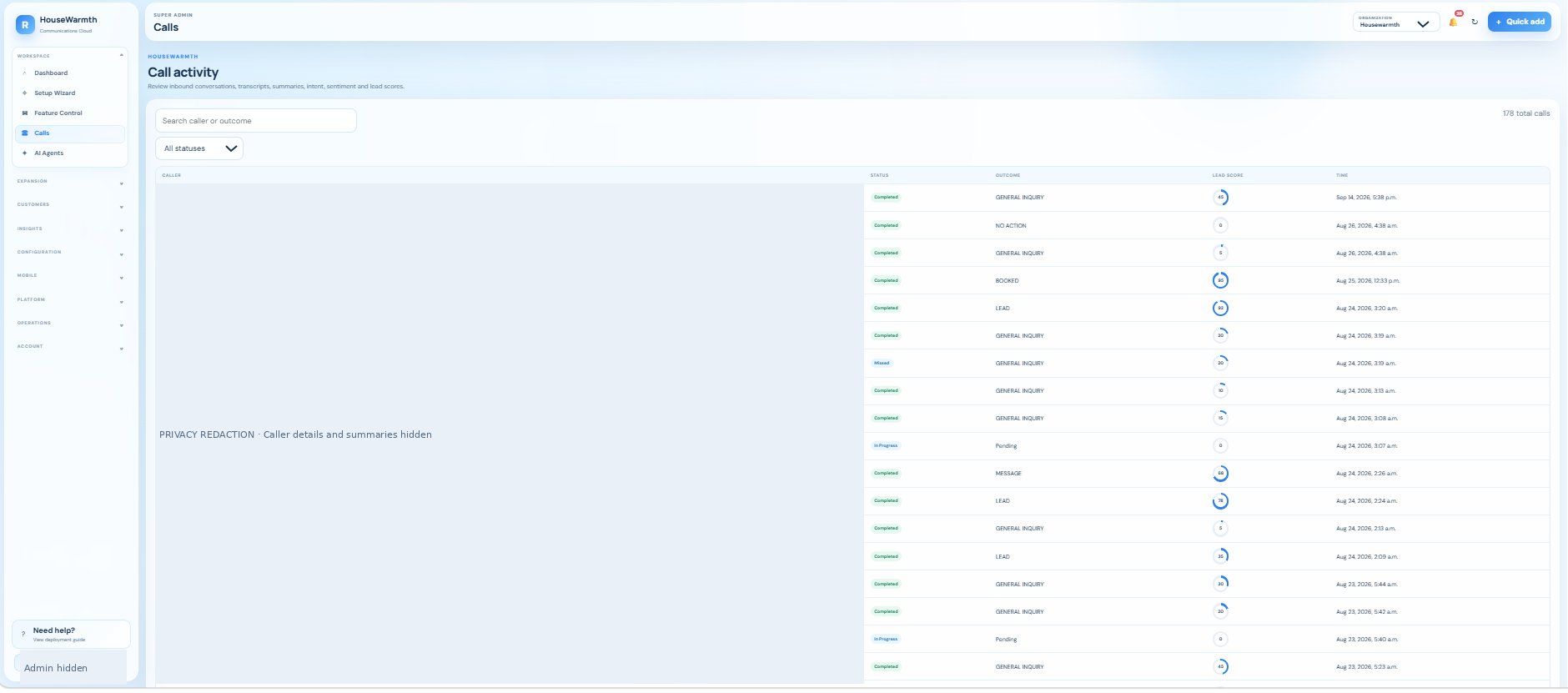
03
The Calls screen shows a searchable activity list with status, outcome, lead score and time. It gives staff a starting point for reviewing what a customer needed and deciding what happens next.
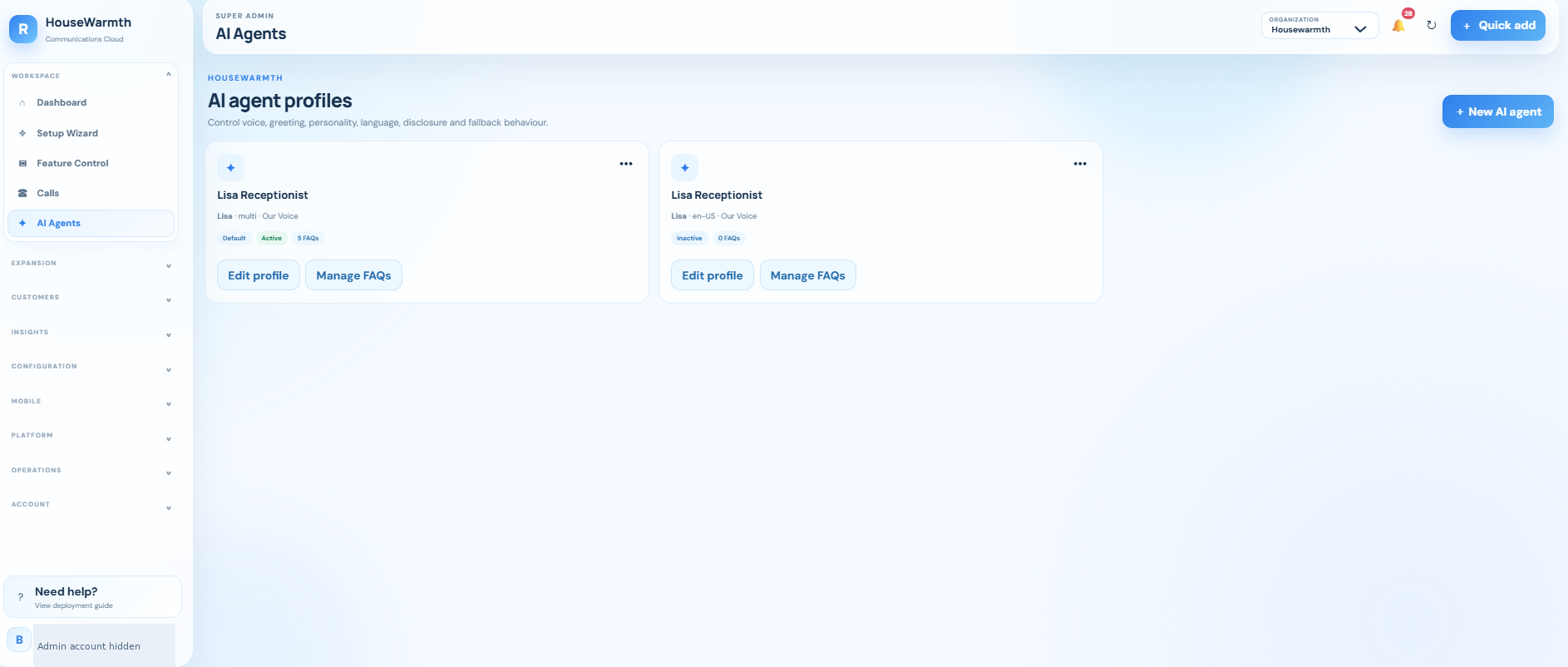
04
AI Agents shows individual profiles, default and active states, and controls to edit a profile or manage its FAQs. Its page introduction identifies voice, greeting, personality, language, disclosure and fallback behaviour.
05
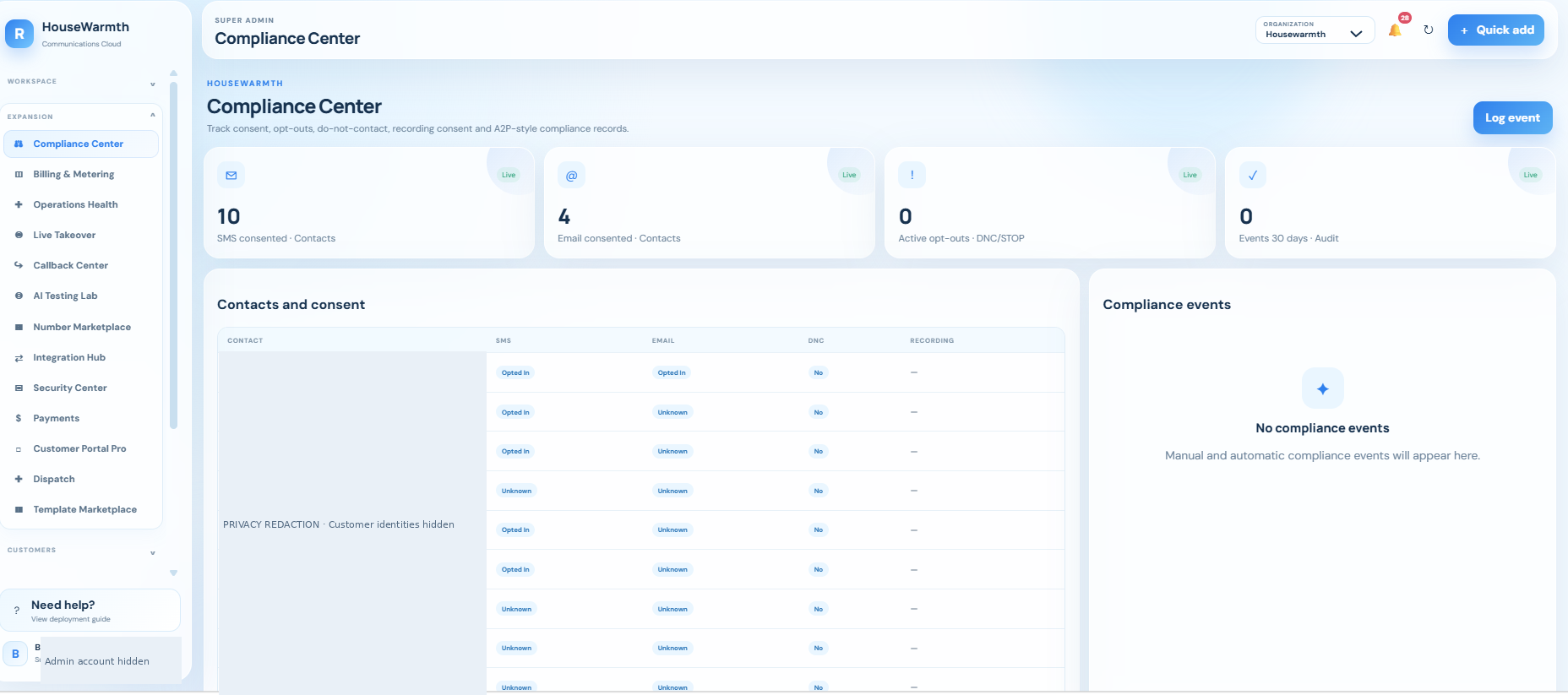
Compliance Center presents SMS and email consent states, do-not-contact flags, recording-consent fields and a separate event area. Your team can inspect these records as part of its own communication process.
THE ADMINISTRATION GUIDE
Screen-supported means a view or descriptive feature card is supplied. Brochure-supported means the supplied Reception AI brochure describes the function. Menu only means a label is visible: its proposed role and supported actions still need confirmation. An enabled badge does not prove every action or integration has been tested.
See activity, review conversations and control the front-desk experience.
Screen-supported
Bring recent calls, new leads, appointment activity and launch readiness into one overview. The supplied screen includes separate cards and tables, so a manager can decide where to look next without opening every module.
During setup
Choose the operational measures and team responsibilities that matter to your business.
Menu only — confirm scope
A dedicated starting point for onboarding appears in the workspace menu. Its intended role is to guide the setup of your business information and communication services before the receptionist is used with customers.
During setup
Confirm the actual onboarding steps and connected services during your consultation.
Screen-supported
Activate the modules appropriate to an organization rather than presenting every business with the same workspace. The supplied screen describes hiding disabled modules from navigation and blocking their API access.
During setup
Agree the enabled modules, permissions and package; enforcement still needs deployment testing.
Screen-supported
Review call activity with searchable caller/outcome information, status, a recorded outcome, lead score and time. The screen also describes transcripts and summaries, helping staff understand the reason for a follow-up.
During setup
Define the outcomes, qualification rules, recording policy and who follows up.
Screen-supported
Manage individual receptionist profiles. The supplied view shows profile editing, FAQ management, a default profile and active/inactive states; its introduction covers voice, greeting, personality, language, disclosure and fallback behaviour.
During setup
Approve each greeting, knowledge source, voice and escalation response.
Select additional functions around communication, controls and customer service.
Screen-supported
Review SMS and email consent states, do-not-contact flags, recording-consent fields and compliance events. This gives the team a place to inspect the records used by its communication process; it is not a compliance certification.
During setup
Set approved notices, consent rules and escalation responsibilities.
Screen-supported
The interface identifies a plan, usage limits and a Billing, Plans & Usage Metering module. Its feature card describes subscription plans, usage caps, overages, reseller costs and revenue reporting.
During setup
Confirm included allowances and actual billing integrations; no prices are inferred from the screenshot.
Screen-supported
The feature card describes provider and queue health checks, synthetic tests and incident tracking. This is intended to help an operator distinguish a customer-facing issue from a service or processing problem.
During setup
Choose who receives alerts and how an incident is handled.
Screen-supported
The Live Human Takeover Console feature describes agent presence, active calls, takeover requests, transfers and escalation logging. It provides a route for involving a person when an automated conversation needs help.
During setup
Confirm staffed hours, transfer destinations and which monitoring modes are supported and permitted.
Menu only — confirm scope
A dedicated callback area appears in the navigation. We would use this area to organize enquiries that require a return call, with clear ownership and next steps rather than relying on a staff member’s memory.
During setup
The callback screen and exact supported actions were not supplied; confirm them in the live walkthrough.
Screen-supported
The feature card describes test calls, SMS, chat answers and knowledge retrieval, including expected-answer pass/fail results before going live. It is a place to rehearse normal and difficult scenarios using approved business information.
During setup
Build a test set from your most common enquiries and known escalation cases.
Screen-supported
The Number Marketplace & Porting feature describes number search, reserve/buy actions, port-in requests, port-out tracking and provisioning status. Number availability depends on the configured provider and deployment.
During setup
Confirm country coverage, ownership, forwarding and any porting requirements.
Screen-supported
The feature card identifies CRM, field-service, accounting, automation and notification connections in one place. Integrations should support your existing workflow rather than require every customer to change systems.
During setup
List the actual applications, permissions and data handoffs your business needs.
Screen-supported
The Advanced Security Center feature describes a two-factor policy, IP allowlists, session controls, API keys, administrator approvals and a security-event audit. These are configurable controls, not proof that every policy is already enforced.
During setup
Confirm roles, access boundaries, retention and security testing with your implementation team.
Screen-supported
The Payment Collection feature describes deposits, payment requests, receipts, payment status and payment links for invoices or appointments. This is an optional extension to the customer journey.
During setup
Confirm the approved payment provider and customer authorization; no payment processing is included in this webpage.
Screen-supported
The Customer Portal Expansion feature describes customer self-service for rescheduling, uploads, quote approval, signatures, payments and reviews. It extends the conversation into a customer-facing next step.
During setup
Choose the enabled portal actions and connect the services needed for each one.
Screen-supported
The Field Service Dispatch feature describes technicians or crews, jobs, route notes, job status, photos, checklists and completion notes. It can be relevant to Home Improvements businesses with a field team.
During setup
Confirm the real scheduling/dispatch workflow and who is authorized to assign work.
Screen-supported
The feature card describes industry-specific prompts, FAQs, workflows, SMS/email templates and setup packs. These offer a starting point that still needs to be checked against the individual business.
During setup
Select the relevant industry pack, then approve the business-specific wording and rules.
Screen-supported
An additional Feature Control card describes warm transfers, named routing, recording consent, voicemail transcription, alerts and supervisor controls. This is distinct from the call-history list.
During setup
Approve routing and consent behaviour and confirm the supported telephony features.
Connect enquiries with the information and next action your team needs.
Screen-supported
The dashboard shows recently added contacts, stages and scores, and the brochure describes lead notes, activity history and consent. The CRM area gives your team a place to organize the opportunity after the first conversation.
During setup
Choose required contact fields, lead stages, qualification criteria and follow-up ownership.
Owner + brochure
The dashboard includes upcoming appointments and a calendar readiness item. Geeks configures industry-specific qualification followed by appointment setting, so the conversation can end with a practical next step.
During setup
Confirm availability, appointment types, staff routing and what counts as a confirmed booking.
Brochure
The menu includes a dedicated SMS inbox. The supplied brochure describes inbound/outbound text conversations, delivery status, templates and AI-assisted replies, keeping text follow-up alongside the rest of the customer history.
During setup
Set sender identity, consent rules, approved wording and human handoff.
Brochure
The menu and brochure identify website chat that can answer from business knowledge and capture leads. It provides another entry point for customers who prefer asking a question online rather than calling.
During setup
Confirm widget placement, approved sources and the relationship with the separate Website Assistant product.
Brochure
Send the appropriate supporting information after an enquiry. The brochure describes uploaded PDFs and brochures that can be delivered by email or an SMS link when a customer asks for more detail.
During setup
Approve the files, delivery method and the situations in which each package should be offered.
Menu only — confirm scope
An Estimate Builder entry is visible in the customer menu. Its proposed role is to help turn qualified project information into the next estimate step; the screenshot does not establish automatic pricing or quote approval.
During setup
Confirm the estimate fields, pricing source and approval workflow in the live product.
Menu only — confirm scope
A Photo Intake entry is visible. For an appropriate workflow, customer-provided images can add context before a team member evaluates a project; the available upload, storage and review behaviour must be confirmed.
During setup
Decide which photos are useful and who can view them.
Menu only — confirm scope
A Document Generator entry is visible. We would position it as the place for preparing approved customer documents from captured information, subject to confirmation of the actual templates and export formats.
During setup
Identify the required documents and human approval steps.
Menu only — confirm scope
The customer navigation includes a portal entry separate from Customer Portal Pro. The exact base-portal permissions and self-service functions are not shown in the supplied capture.
During setup
Confirm what customers can see or do before presenting it as part of a plan.
Menu only — confirm scope
A Reputation Manager entry is visible. Its proposed role is to organize appropriate feedback and review follow-up after customer interactions; supported channels and automation have not been demonstrated here.
During setup
Approve the request wording, timing and destination; do not imply guaranteed reviews or ratings.
Brochure
The menu includes follow-up campaigns, and the brochure describes sequences after missed calls, appointments, estimates and quote requests. These help the business plan the next contact rather than end at lead capture.
During setup
Approve triggers, timing, consent and when a human should take over.
Menu only — confirm scope
A Rescue Queue entry is visible. It suggests a place for conversations or opportunities needing intervention, but the capture does not show how items are selected, prioritized or resolved.
During setup
Confirm entry rules, ownership and the resolution process in the live walkthrough.
Menu only — confirm scope
A Listings & MLS entry is visible in the customer menu. Its presence does not establish access to a particular board, listing feed or Ontario real-estate dataset.
During setup
Confirm authorized data access, permissions, freshness and the exact supported listing workflow.
Review activity and improve the process with evidence rather than assumptions.
Menu only — confirm scope
A Business Intelligence entry is visible. Its proposed role is to summarize the business implications of recorded activity so managers can investigate lead flow and follow-up performance.
During setup
Confirm the available reports and data behind each measure.
Menu only — confirm scope
An AI Coach entry is visible. The intended business use is to help staff review and improve conversations; no particular coaching method or automated performance result is established by the screenshot.
During setup
Confirm how recommendations are produced and who reviews them.
Menu only — confirm scope
A Quality Center entry is visible. We would use it to make conversation review and quality checks part of the operating process, with standards appropriate to the industry.
During setup
Approve the quality criteria and confirm the implemented review controls.
Menu only — confirm scope
A Marketing Attribution entry is visible. It can be presented as a potential place to connect enquiries with their source once the necessary tracking is configured.
During setup
Confirm attribution rules and avoid equating a source label with proven campaign revenue.
Brochure
The brochure describes reporting for calls, SMS, chat, leads and appointments. Reports help owners review what was recorded, where follow-up is needed and how the configured process is being used.
During setup
Confirm report scope, date ranges, permissions and export options.
Brochure
The menu and brochure include usage information for communications activity. Its role is to make consumption visible alongside plan allowances and operating decisions.
During setup
Confirm the measured units, update frequency and plan limits.
Brochure
An Audit Log entry is visible, and the brochure describes audit history and security controls. It provides a place to examine recorded actions; exact event coverage and retention must be confirmed.
During setup
Decide which changes need traceability and who may inspect the log.
Your knowledge, qualification questions, voices, schedules and service boundaries.
Brochure
The supplied brochure describes approved FAQs, documents, notes, service information and policies used across phone, SMS and chat. Business knowledge gives the receptionist a more relevant foundation than a generic script.
During setup
Supply current source material, approval ownership and a review schedule.
Menu only — confirm scope
The menu contains a Knowledge Gaps area. The intended workflow is to capture questions that need a team answer, approve the response and make it available for future conversations rather than encouraging guessing.
During setup
Confirm the notification, approval and publication steps in the configured product.
Menu only — confirm scope
A Test Mode entry is visible. We would use a controlled testing state to review prompts and flows before customer-facing release; exact isolation and provider behaviour require a live check.
During setup
Define a test business, safe test contacts and actions that must never occur in a test.
Screen-supported
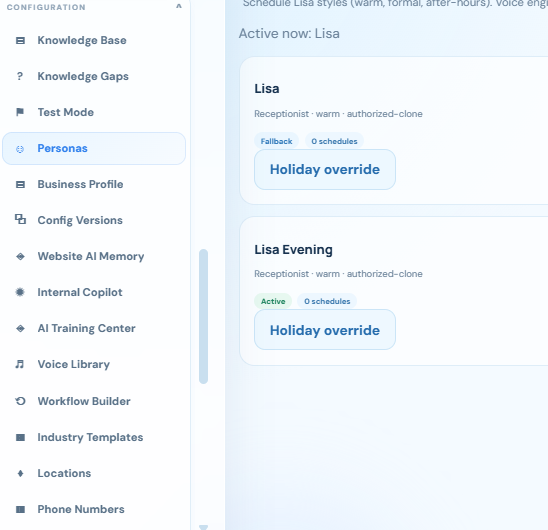
The supplied screen shows multiple persona cards, active/fallback labels, schedule indicators and holiday-override controls. It lets the business plan different receptionist styles around its operating needs.
During setup
Approve voices, greetings, schedules, timezone and fallback behaviour.
Menu only — confirm scope
A Business Profile entry is visible. Its intended purpose is to keep the company-specific facts behind the experience together, such as services, service areas and how the team handles enquiries.
During setup
Confirm the facts and qualification questions your receptionist is allowed to use.
Menu only — confirm scope
A Config Versions entry is visible. It suggests versioned configuration, but the supplied menu does not show comparison, restore or approval functionality.
During setup
Confirm version history and safe rollback before depending on it operationally.
Menu only — confirm scope
A Website AI Memory entry is visible. Its proposed role is to manage business knowledge associated with website interactions; the capture does not prove what is stored or how long it is retained.
During setup
Confirm scope, user isolation, source ownership and retention.
Menu only — confirm scope
An Internal Copilot entry is visible. It suggests a staff-facing assistant rather than the public receptionist; available sources, actions and permissions need to be demonstrated.
During setup
Define staff use cases and ensure internal information is not exposed to callers.
Menu only — confirm scope
An AI Training Center entry is visible. Its exact training or knowledge-curation workflow is not shown, so the website should not imply automatic model retraining or learning from every customer conversation.
During setup
Confirm what is reviewed, approved and changed by this module.
Brochure
A Voice Library entry is visible; the brochure also describes configurable voice style and speaking speed. Voice options should fit the company’s audience and be approved before use.
During setup
Confirm available providers, licensing and any authorization required for cloned voices.
Menu only — confirm scope
A Workflow Builder entry is visible. Its proposed role is to define how intake, follow-up and handoff steps fit together, but the screenshot does not establish a specific visual editor or trigger catalogue.
During setup
Map the desired journey and confirm supported actions before promising automation.
Menu only — confirm scope
An Industry Templates entry is visible. It complements Geeks’ industry-specific approach by providing a potential starting structure for questions, answers and next steps.
During setup
Adapt the template to the actual business rather than deploying it unchanged.
Menu only — confirm scope
A Locations entry is visible. Its proposed role is to distinguish branches or service locations when enquiries need different business information or routing.
During setup
Confirm the location model, coverage and staff assignment behaviour.
Brochure
The brochure describes phone-number management and primary-number selection. This separates the public number a customer calls from the staff or service that ultimately handles the enquiry.
During setup
Confirm number ownership, routing, forwarding and provider requirements.
Organization-level tools for the appropriate administrative role.
Menu only — confirm scope
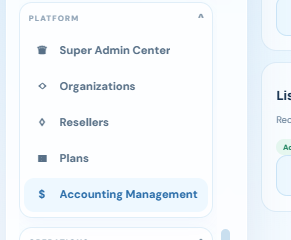
A Super Admin Center entry is visible. It belongs to platform-level administration rather than routine caller handling; the menu does not establish its full controls or access policy.
During setup
Confirm which roles can enter this area and the scope of their permissions.
Screen-supported
The screenshots show an organization selector and an Organizations entry. This supports presenting a company-specific workspace, but a visible selector is not proof of complete tenant isolation.
During setup
Confirm organization separation and access tests before onboarding multiple customers.
Menu only — confirm scope
A Resellers entry is visible. It indicates a reseller-administration area whose actual onboarding, permissions and commercial functions need to be confirmed.
During setup
Discuss the client portfolio and branding requirements in an Agency & Enterprise consultation.
Menu only — confirm scope
A Plans entry is visible alongside billing and metering modules. It suggests plan administration; no actual prices, limits or entitlement enforcement are established by the menu.
During setup
Confirm approved plans and allowances. Agency & Enterprise pricing remains Contact Us.
Menu only — confirm scope
An Accounting Management entry is visible. Its proposed role is to organize accounting-related administration; no ledger, tax, reconciliation or accounting-provider capabilities are demonstrated in the capture.
During setup
Confirm the actual functions and any required accounting-system connection.
The screenshots show a Super Admin workspace. Your agency administrator, manager and receptionist team do not necessarily need the same access. We confirm roles and modules for your deployment. Agency & Enterprise options include Geeks-branded, co-branded or white-label presentation with agreed capacity and scope. Contact us for pricing.
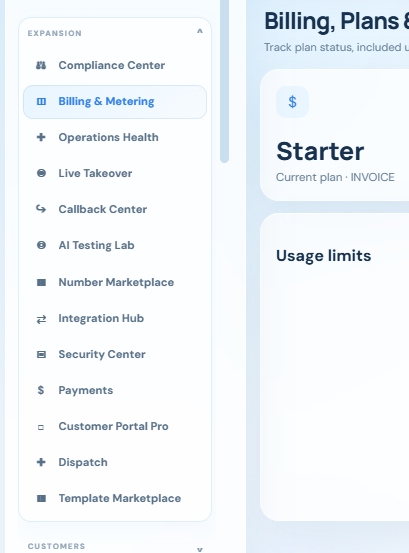
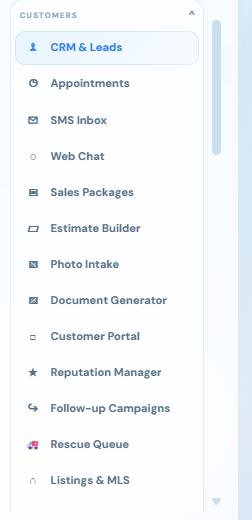
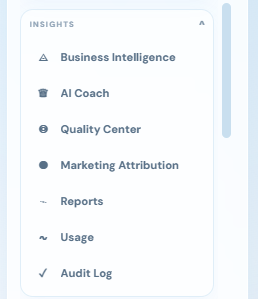
Additional captures identify the customer, insights, configuration and platform areas. Click an image to enlarge.
No. We start with how your business operates: your services, customers, qualification questions, appointment process and online tools. We then configure the conversation and next steps around those requirements.
The example workflow covers buyer or seller intent and relevant details such as timing, preferred area, budget, financing readiness and property requirements. We agree the actual questions with your team. The receptionist supports intake and scheduling; it does not replace a licensed real-estate professional.
The linked Sells More Homes tool provides an automated home-value estimate. Its public page explicitly distinguishes that estimate from a professional appraisal or guaranteed selling price. The receptionist can direct a prospective seller to the tool and help arrange the next conversation with your team.
Yes—this is part of the industry-specific workflow described by Geeks. The HouseWarmth attic tool is one example. We confirm the right link, when it should be offered and whether results need a separate integration to return to the receptionist or CRM.
No. The Feature Control screen shows that modules can be selected by organization. The screenshots are a walkthrough of the supplied interface, not a promise that every module or third-party integration is included in every deployment. We confirm the appropriate scope during the consultation.
The provided feature list includes human takeover, transfers and escalation controls. We agree a suitable handoff process and confirm the connected telephone service, staff availability and supported actions before launch.
The buttons open a request for a free online consultation with Geeks of Cybernet. Your appointment is not confirmed until your team or a connected booking system confirms the time. No payment, call or text message is triggered by this demo page.
LET’S LEARN YOUR BUSINESS
Tell us about your industry, your enquiries and the online tools you already use. We will discuss how a tailored receptionist could help qualify customers and arrange the right next step.
No obligation. This is a consultation request, not an automatically confirmed appointment.